First thing was that I was getting this error when I tried to use Google Analyticator for WordPress and tried to link it with my account get an error:
The page you have requested cannot be displayed. Another site was requesting access to your Google Account, but sent a malformed request. Please contact the site that you were trying to use when you received this message to inform them of the error. A detailed error message follows:
The site “http://mycoolwebsite.com” has not been registered.”
I found this post and this post about the problem and needed to register the domain with my Google Account, in this case my Google Apps Google Account.
So I went to:
https://www.google.com/accounts/ManageDomains
Then 1. put in my site, mycoolwebsite.com and 2. clicked Add:

Then I clicked the “Manage mycoolwebsite.com” link and put in the “Target URL path prefix:” as http://mycoolsite.com
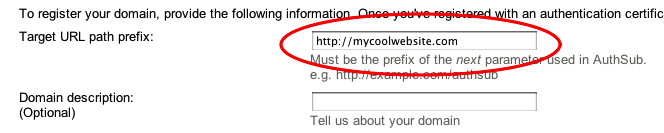
but the when I clicked in the link in WordPress for the Google Analyticator to Plug-In to login into google:

I got the error message:
“The page you have requested cannot be displayed. Another site was requesting access to your Google Account, but sent a malformed request. Please contact the site that you were trying to use when you received this message to inform them of the error. A detailed error message follows:
AuthSub target path prefix does not match the provided “next”URL
I read this and this and found the problem was that the next variable had a leading www. by the Target URL path prefix from above did not, here is the URL from the request:
“https://www.google.com/accounts/AuthSubRequest?next=http%3A%2F%2Fwww.mycoolwebsite.com%2Fwp-ad……”
You’ll notice the leading www. once this was added to the Target URL path prefix (described above):
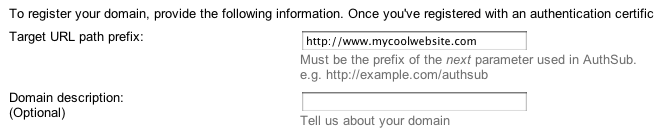
I clicked on the link in WordPress for the Google Analyticator to Plug-In to login into google  this time everything worked great.

14 comments
Have there been any updates to this post. I am trying to use Mailchimps Analytics360 and keep getting the message: “The page you have requested cannot be displayed. Another site was requesting access to your Google Account, but sent a malformed request. Please contact the site that you were trying to use when you received this message to inform them of the error. A detailed error message follows:
The site “http://glitterrings.com” has not been registered.”
I’ve followed your suggestions but I still get the same message. Any insights?
I am experiencing an issue accessing RSS feed. Not sure why I’m unable to subscribe to it. Is there anybody getting an identical issue? Anyone who is aware of this please comment.
Are you having trouble subscribing to the RSS feed of visionwind.com/blog?
I’ve been using this method to set up Analyticator on behalf of clients, but just hit a 20 domain limit. To make matters worse, it doesn’t appear possible to remove already-added domains. Has anyone else run into this yet?
Thank you! That was by far the easiest to understand post I read on my issue and it fixed my problem right away!
Thank you for outlining this; had the exact same problem (and tabled fixing it for quite some time!) and your solution saved me a lot of time when I finally decided to tackle it. Cheers!
finally, someone talking sense about this issue! been banging my head against a brick wall for far too long over this! thanks 🙂
You’re welcome.
Great job, thank you very much.
Thank you so much. 18hrs after trying everything under the sun I finally found your post. Fix the problem in 10 mins and can finally get Yoast’s Google Analytics Plugin to work! Warmest Regards Brent.
Great to hear you got it working. Cheers!
Just wanted to say thank you for taking the time to complete this tutorial.
This helped me out with the exact same problem no end.
Thanks again
Your welcome. Your feedback is greatly appreciated and I’m glad to hear it helped you.
Thank you very, very much! I was in the impression this was a problem with my hosting environment, but following your instructions it’s now all working fine!